PURPLE(1)General Commands ManualPURPLE(1)
What is purple SSH?
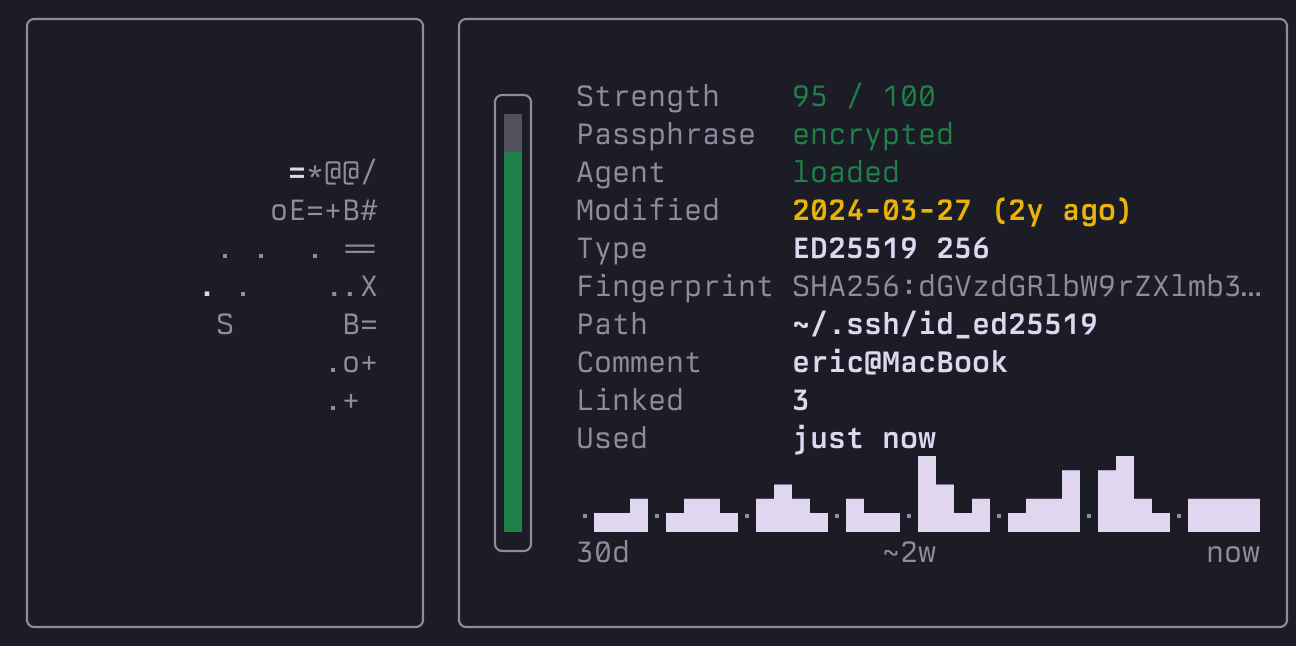
purple is a free, open-source terminal SSH manager and SSH config editor in Rust for macOS and Linux that keeps ~/.ssh/config in sync with 18 cloud providers, monitors live SSH tunnels and manages Docker and Podman containers fleet-wide. New VMs appear in your host list automatically and decommissioned hosts dim. Plus instant fuzzy search, visual file transfer, command snippets, multi-host SSH key push, short-lived HashiCorp Vault SSH certificates and automatic password management. Single binary, no account, no telemetry.
Is purple a free, open source Termius alternative?
Yes. purple is free, MIT licensed, needs no account and runs natively in your terminal. It edits your real ~/.ssh/config with round-trip fidelity instead of locking hosts in a proprietary database, and it syncs with 18 cloud providers. You also get live SSH tunnel monitoring, fleet-wide Docker and Podman management and an MCP server for AI agents, which Termius does not offer. Termius remains the better fit if you want mobile apps or a desktop GUI; for terminal workflows purple covers everything.
Is purple an SSH bookmark manager?
Yes. purple stores every SSH host in ~/.ssh/config as a named bookmark, fuzzy-searches them by alias, hostname or tag and connects on Enter. Frecency sorting keeps your most-used bookmarks on top. purple also keeps your bookmarks in sync with 18 cloud providers and signs short-lived Vault SSH certificates.
What cloud providers does purple support?
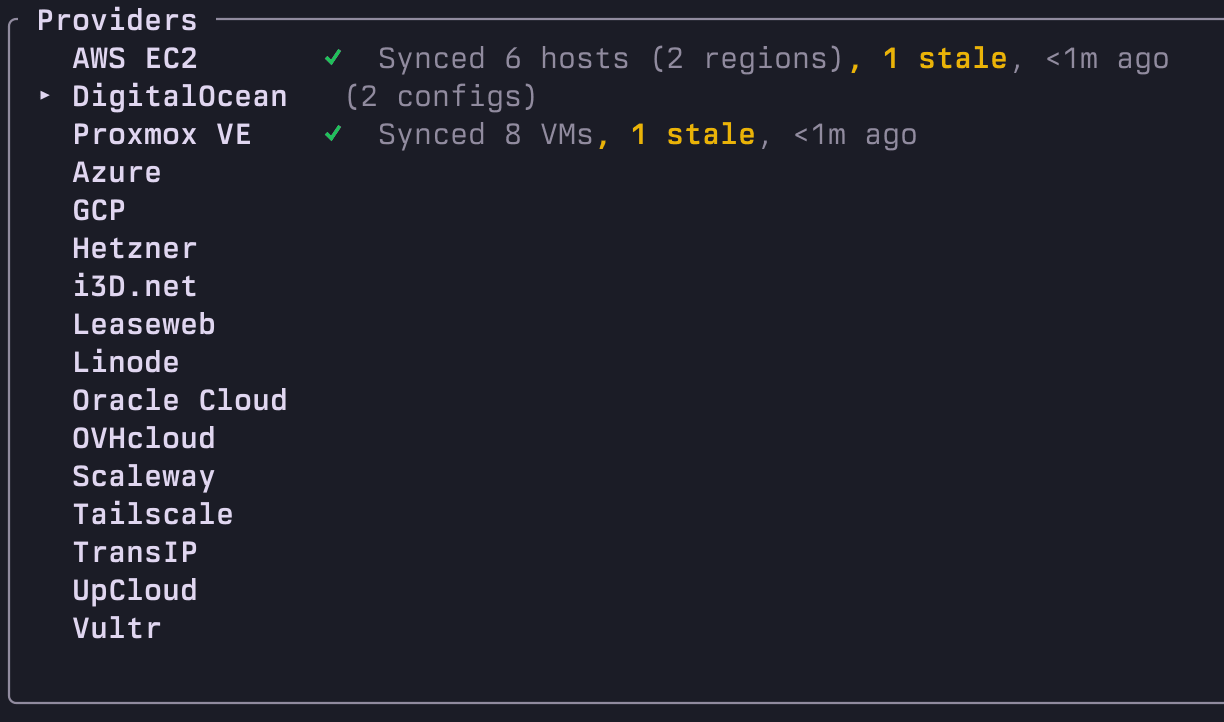
purple keeps ~/.ssh/config in sync with 18 cloud providers: AWS EC2, Azure, DigitalOcean, GCP (Compute Engine), Hetzner, i3D.net, Leaseweb, Linode (Akamai), NetBox, Oracle Cloud Infrastructure (OCI), OVHcloud, Proxmox VE, Scaleway, Tailscale, Teleport, TransIP, UpCloud and Vultr. Drop in one API token per provider. New VMs appear in your host list automatically. Decommissioned hosts dim. No manual ssh config edits.
How do I sync AWS EC2 instances with purple?
In the TUI, press S to open the provider list, then add AWS. Select your regions from the region picker and press Space on the Profile field to pick a profile purple found in ~/.aws. Leave the Profile and Token fields empty and purple uses the AWS_ACCESS_KEY_ID and AWS_SECRET_ACCESS_KEY exported in the shell it was started from. The CLI alternative is purple provider add aws --profile default --regions us-east-1,eu-west-1. For several accounts under an Organization, give each one a label and a profile with role_arn plus source_profile: purple assumes the role per account. Set Session Manager to auto and instances reachable through AWS Systems Manager get a ProxyCommand, so even an instance with no public address answers. EC2 tags are synced (excluding internal aws:* tags). AMI names are resolved for OS metadata.
How do I sync Google Cloud (GCP) instances with purple?
In the TUI, press S to open the provider list, then add GCP. Fill in your service account JSON key file path, project ID and optionally specific zones. Purple reads the key, creates a JWT and exchanges it for an access token automatically. The CLI alternative is purple provider add gcp --token /path/to/sa-key.json --project my-project.
How do I sync Azure VMs with purple?
In the TUI, press S to open the provider list, then add Azure. Fill in your service principal JSON file path and subscription IDs. Supports both az CLI and portal credential formats. The CLI alternative is purple provider add azure --token /path/to/sp.json --regions SUBSCRIPTION_ID.
How do I sync Oracle Cloud Infrastructure (OCI) instances with purple?
In the TUI, press S to open the provider list, then add Oracle. Fill in your OCI config file path, compartment OCID and regions. The CLI alternative is purple provider add oracle --token ~/.oci/config --compartment OCID --regions eu-amsterdam-1. Requires IAM policies: read instance-family and read virtual-network-family.
How do I monitor SSH tunnels in the terminal?
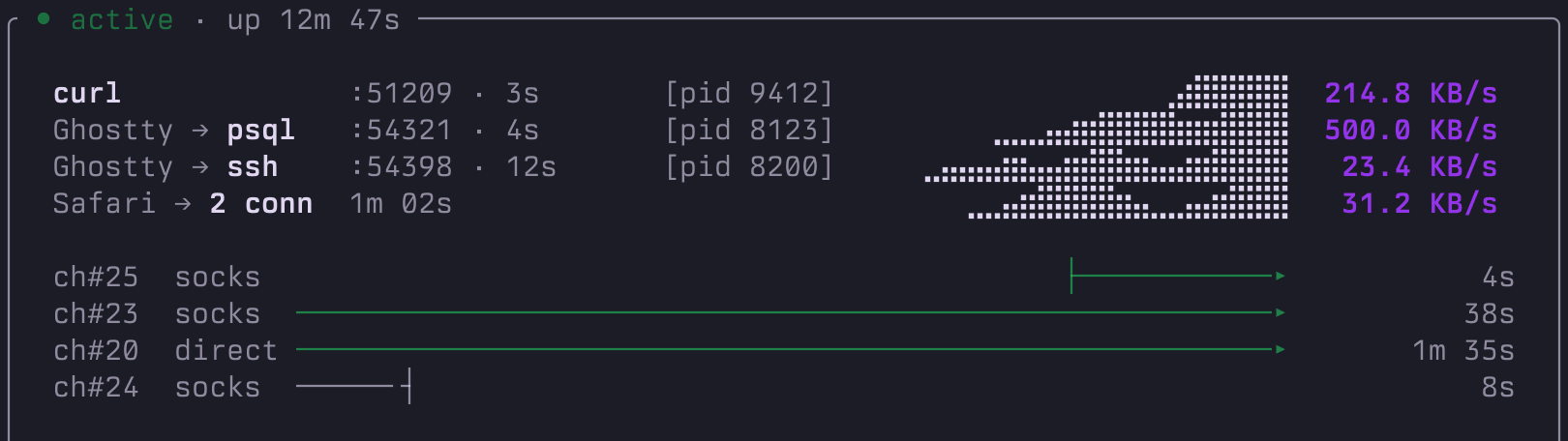
Press Tab from the host list to switch to the dedicated Tunnels page. Every SSH forward across all your hosts shows up in one sortable, searchable list with current throughput, uptime and a green dot when active. The detail panel on the right opens automatically for active tunnels and shows: a per-client process roster (PID, source port, age, current bytes per second, sparkline of recent throughput, responsible app reported by the OS), a 20-second swimlane of channel opens and closes (Direct channels for LocalForward and RemoteForward, Dynamic channels for SOCKS), and uptime, peak concurrent and total opens counters. Sort with s, search with /, add a tunnel with a or use T from the host list for the per-host tunnel overlay.
How do I manage Docker containers across multiple servers from one terminal?
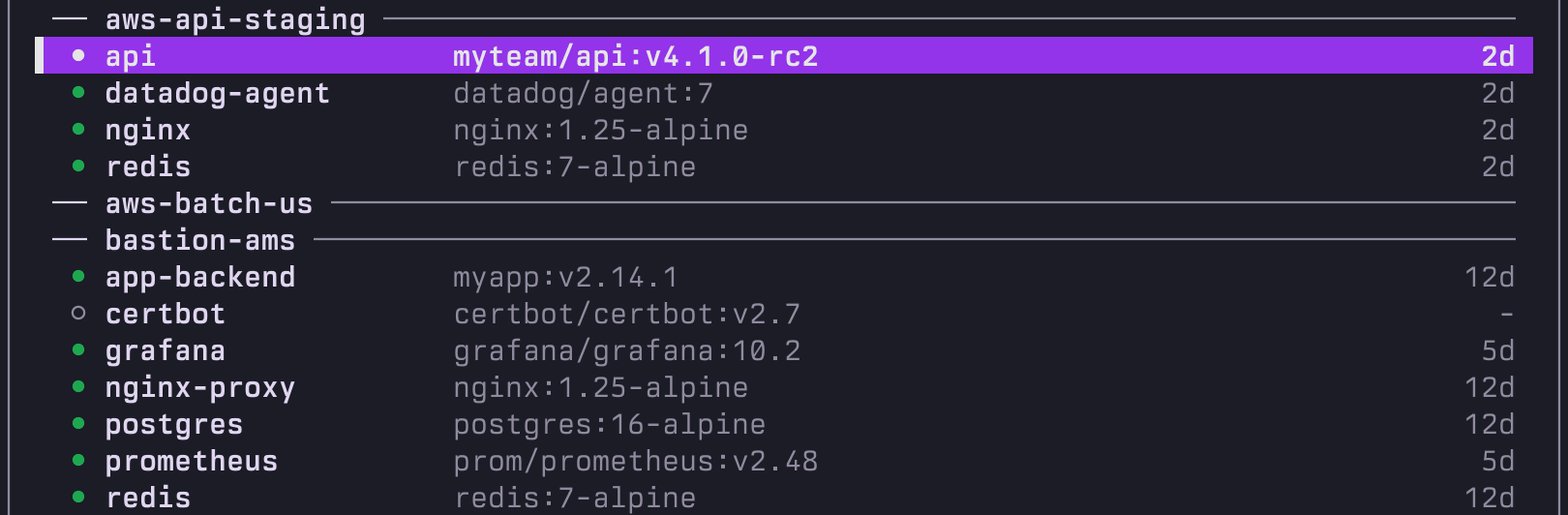
Press Tab from the Hosts page until you reach purple's dedicated Containers page. Every Docker and Podman container across your fleet appears in one list, grouped per host. The detail panel summarizes engine version, runtime, sync age and running counts when the cursor sits on a divider. Enter shells in. l tails the last 200 log lines. K restarts. S stops. e runs a one-off command. Ctrl-K cycles a compose stack member by member. R refreshes every host in parallel (max four at a time). Auto-detects Docker or Podman. It needs no agent on the remote, no web UI and no extra ports.
Can I manage Docker or Podman containers with purple?
Yes. The Containers page lists every container across every cached host in one view, grouped per host. Enter shells in. l tails logs. K restarts. S stops. e runs a one-off command. Ctrl-K cycles a whole compose stack member by member. K or S on a host divider sweeps every running container on that host at once. The detail panel reads docker inspect once and remembers, so image digest, restart policy, mounts, network and healthcheck render instantly. Per-host C overlay still works on the Hosts page. Auto-detects Docker or Podman. No agent, no web UI, no extra ports.
How does purple compare to Lazydocker?
Lazydocker is built for one local host. purple's Containers page lists every container across every cached SSH host in one view: shell in, stream logs, restart, stop, exec or cycle a whole compose stack. R refreshes the whole fleet in parallel. K or S on a host divider sweeps every running container on that host at once. The detail panel reads docker inspect once and remembers, so image digest, restart policy, mounts, network and healthcheck render instantly. Use Lazydocker for single-host local management. Use purple for fleet-wide remote management.
Is purple a Portainer alternative?
For container visibility and lifecycle control (shell, logs, restart, stop, exec, stack restart) over SSH, yes. The Containers tab lists every container across every host, grouped per host. No agent to install, no web UI to host, no ports to open. Works with Docker and Podman. Purple does not provide container creation, registry management or role-based access control.
Can AI assistants use purple?
Yes. Run
curl -fsSL getpurple.sh | sh, then
purple mcp to start the MCP server. Claude Code, Cursor, Windsurf and other agents get five tools: list_hosts, get_host, run_command, list_containers and container_action. Pass
--read-only to restrict it to list_hosts, get_host and list_containers. Every call is logged to
~/.purple/mcp-audit.log by default (JSON Lines, mode 0o600, run_command body redacted). Claude Desktop users can install the
.mcpb bundle from
GitHub releases for a one-click setup. Full setup guide on the
wiki.
Can I transfer files between local and remote servers with purple?
Yes. Press F on any host to open the remote file explorer. It shows local files on the left and the remote server on the right. Navigate directories, select files and copy them between machines via scp. Works through ProxyJump chains, password sources and active tunnels.
How do command snippets work in purple?
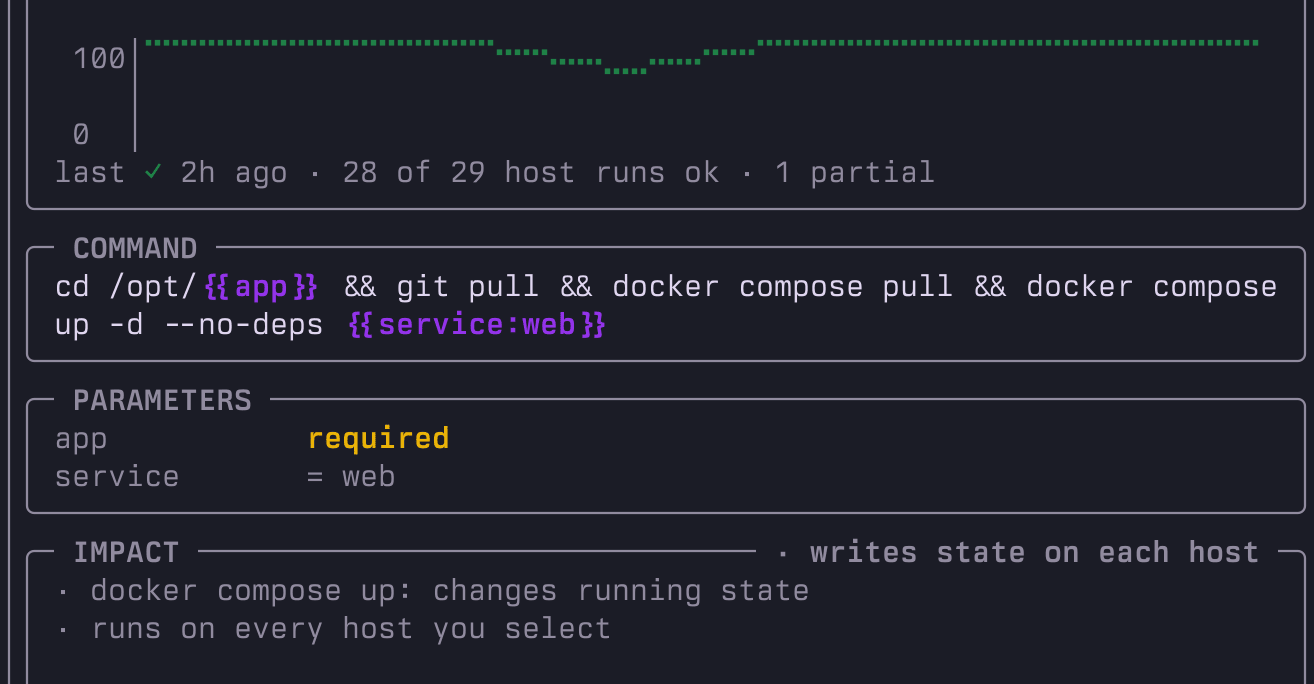
Save commands and run them on remote hosts via SSH. In the TUI, press r to run on the selected host, Space to multi-select hosts then r, or R to run on all visible hosts. purple shows a command's blast radius before you fan it out and tracks every run per snippet. The CLI alternative supports tag-based targeting (--tag prod) and parallel execution (--parallel). Snippets are stored locally in ~/.purple/snippets.
How does SSH password management work in purple?
Set a password source per host via the TUI or a global default. When you connect, purple acts as SSH_ASKPASS and retrieves the password automatically. Supported sources: OS Keychain, 1Password, Bitwarden, pass, HashiCorp Vault KV secrets engine, Proton Pass and custom commands. For short-lived SSH certificates purple also integrates with the HashiCorp Vault SSH secrets engine (a separate engine).
Does purple modify my existing SSH config?
Only when you add, edit, delete or sync. All writes are atomic with automatic backups. Auto-sync runs on startup for providers that have it enabled (configurable per provider).
Will purple break my SSH config comments or formatting?
No. purple preserves comments, indentation and unknown directives through every read-write cycle. Consecutive blank lines are collapsed to one.
Does purple need a daemon or background process?
No. purple is a single Rust binary. Run it, use it, close it. No runtime, no daemon, no async framework.
Does purple send my SSH config anywhere?
No. Your config never leaves your machine. Provider sync calls cloud APIs to fetch server lists. The TUI checks GitHub for new releases on startup (cached for 1 hour). No config data is transmitted.
Can I use purple with SSH Include files?
Yes. Hosts from Include files are displayed in the TUI but never modified. purple resolves Include directives recursively (up to depth 16) with tilde and glob expansion.
How do I troubleshoot connection problems?
Run with --verbose to enable debug logging, then purple logs --tail in another terminal. Logs are written to ~/.purple/purple.log with fault domain prefixes: [external] for remote/tool errors, [config] for local config issues. Set PURPLE_LOG=trace for maximum detail.
Does purple follow the XDG Base Directory specification?
Yes, once you set the variables. With XDG_CONFIG_HOME, XDG_DATA_HOME, XDG_STATE_HOME or XDG_CACHE_HOME set (or a PURPLE_CONFIG_DIR, PURPLE_DATA_DIR, PURPLE_STATE_DIR or PURPLE_CACHE_DIR override) purple keeps that category under $XDG_..._HOME/purple: preferences, snippets, providers and themes are config, certificates and the original SSH config backup are data, history, recents and logs are state, the container cache and version check are cache. Existing files are copied over on the first run and ~/.purple is left untouched. Without those variables everything stays in ~/.purple.